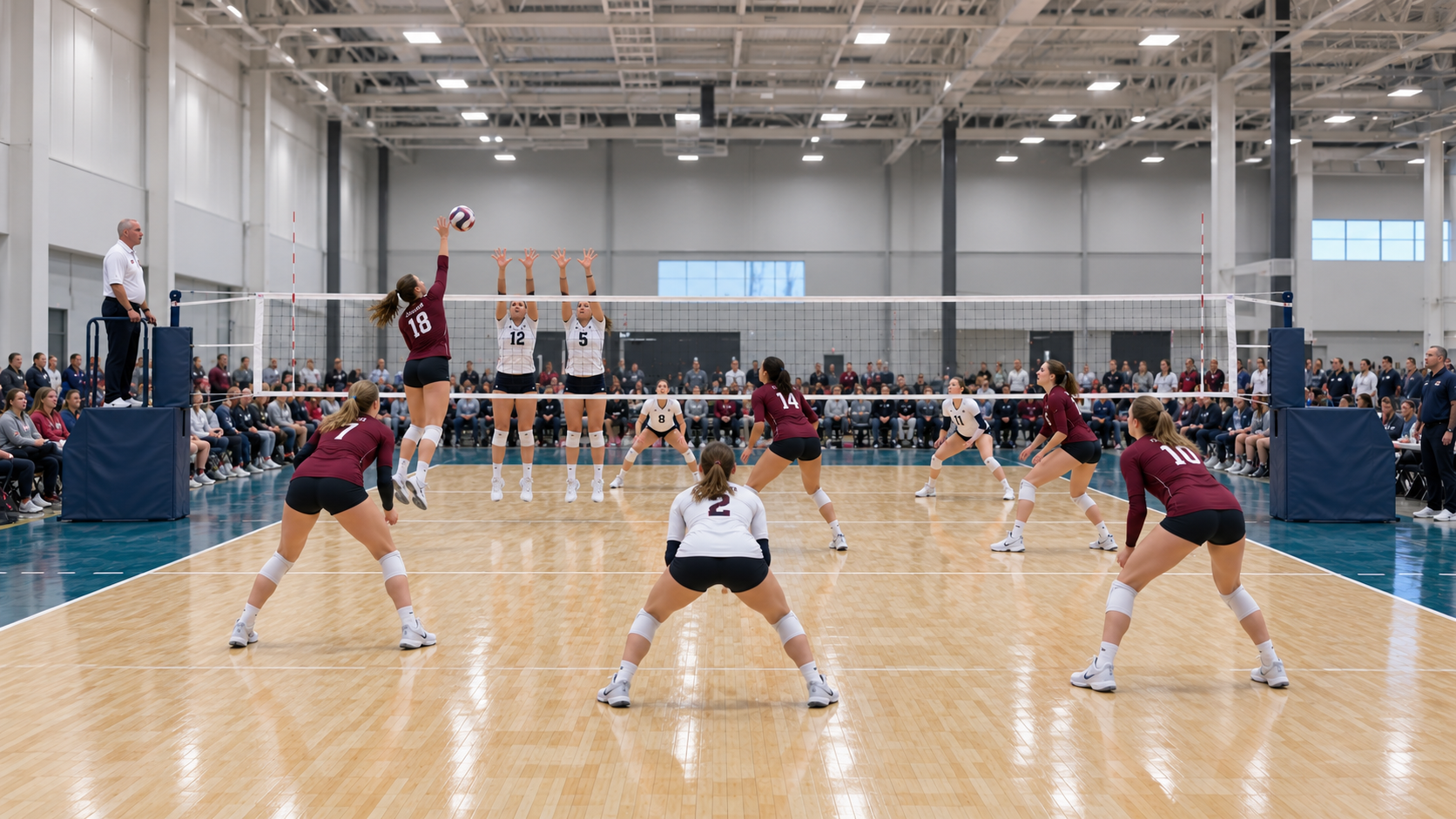
SideOut · YOUR VOLLEYBALL WORKSPACE

Every play.
In full view.

Live video. Courtside stats. A deeper understanding of your game.

Detailed statsSummaryOpponent comparisonScoring runsPlayer focusTrajectories
Kills3084 attacks
Attack efficiency0.2509 attack errors
Serves in90.5%38 of 42
Pass average2.1241 rated receptions
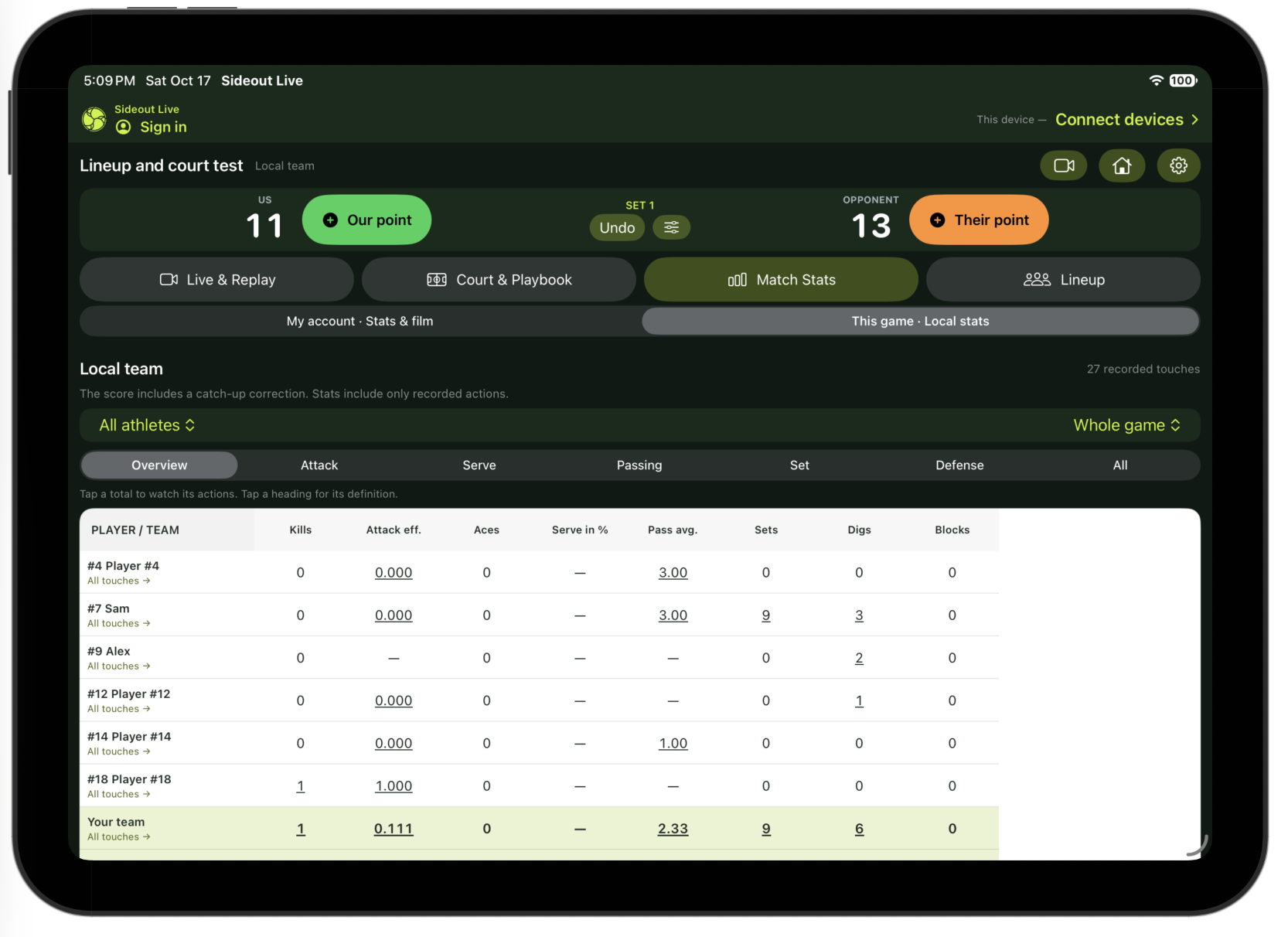
Player and team statisticsSample game report
Overview   ·   Attack   ·   Serve   ·   Passing   ·   Set   ·   Defense   ·   All
PLAYER / TEAMKillsErrAttEffAcesSrvIn %PassesAvgSetsDigsBlocks
#4 JordanMiddle4190.3330580.0%42.25261
#7 SamSetter2040.50017100.0%22.505390
#9 AlexOutside83250.2001988.9%122.252121
#12 RileyOutside62190.2111887.5%142.071100
#14 MorganRight side52140.2141785.7%61.83251
#18 CaseyMiddle51130.30816100.0%32.00141
Your teamWhole-game sample309840.25054290.5%412.1261464
TEAM REPORTSCOURT + LIVE PREVIEW
Camera deviceiPhone or iPad · recordLIVE LINK↔Coach dashboardiPhone or iPad · stats + replayUPLOAD→WebTeam + player reports

Connect two iPhones, two iPads or one of each for live play. Upload for online review with an eligible plan.

Connect & stat liveReplay & refineExplore advanced statsUpload for AI review

TWO WAYS TO START. ONE CLEARER PICTURE.

Stat the moment.
Or start with the film.

Keep stats as the match unfolds, or record first and upload for an AI-assisted breakdown. You stay in control of the review.

01 / CONNECT & STAT LIVE

Live game stats.
Two devices. One team.

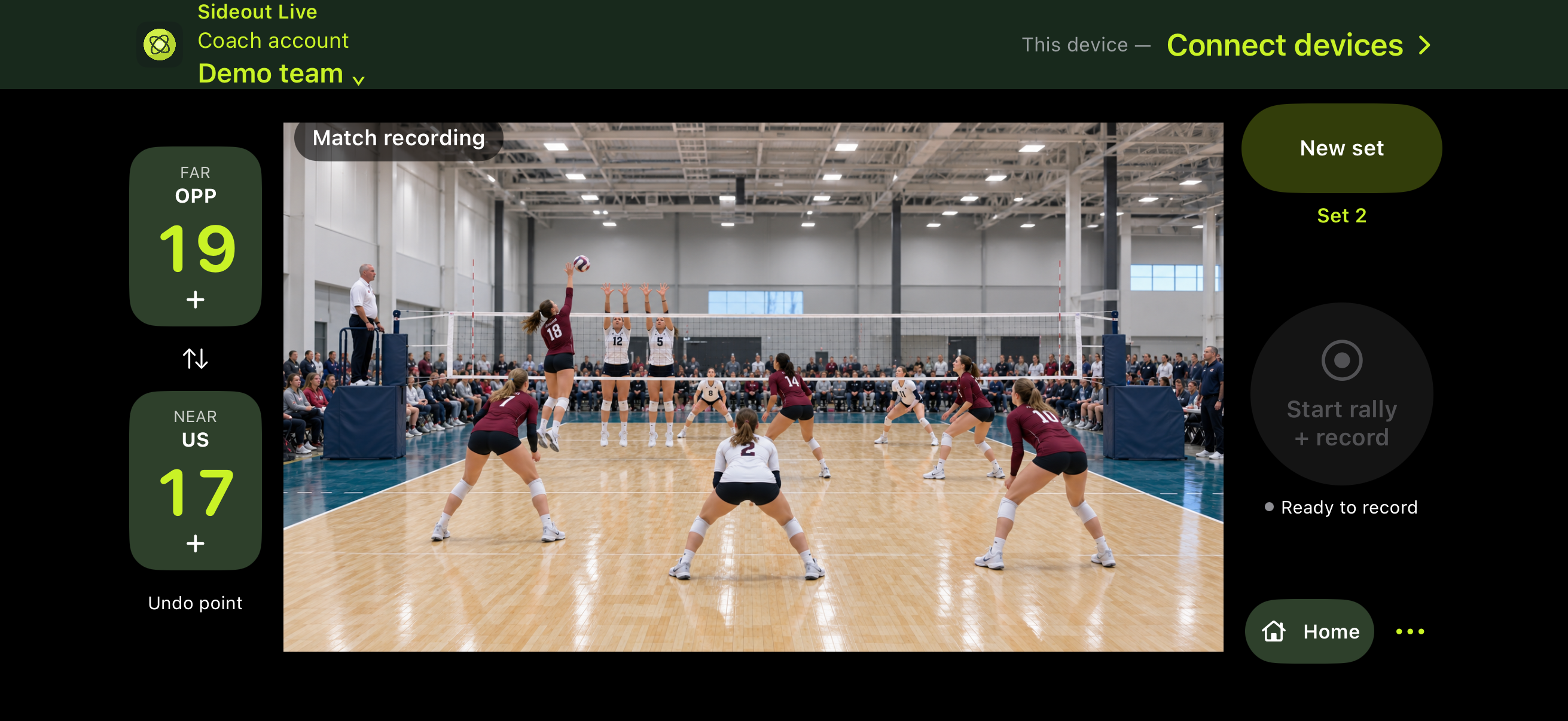
Connect two iPhones, two iPads or one of each. One records while you keep live stats, follow rotations and replay the action on the other.

Recording deviceCapture the match
Courtside deviceKeep the live stats
Video + actions + live stats
  • Score, rotations and substitutions
  • Passing ratings and player stats
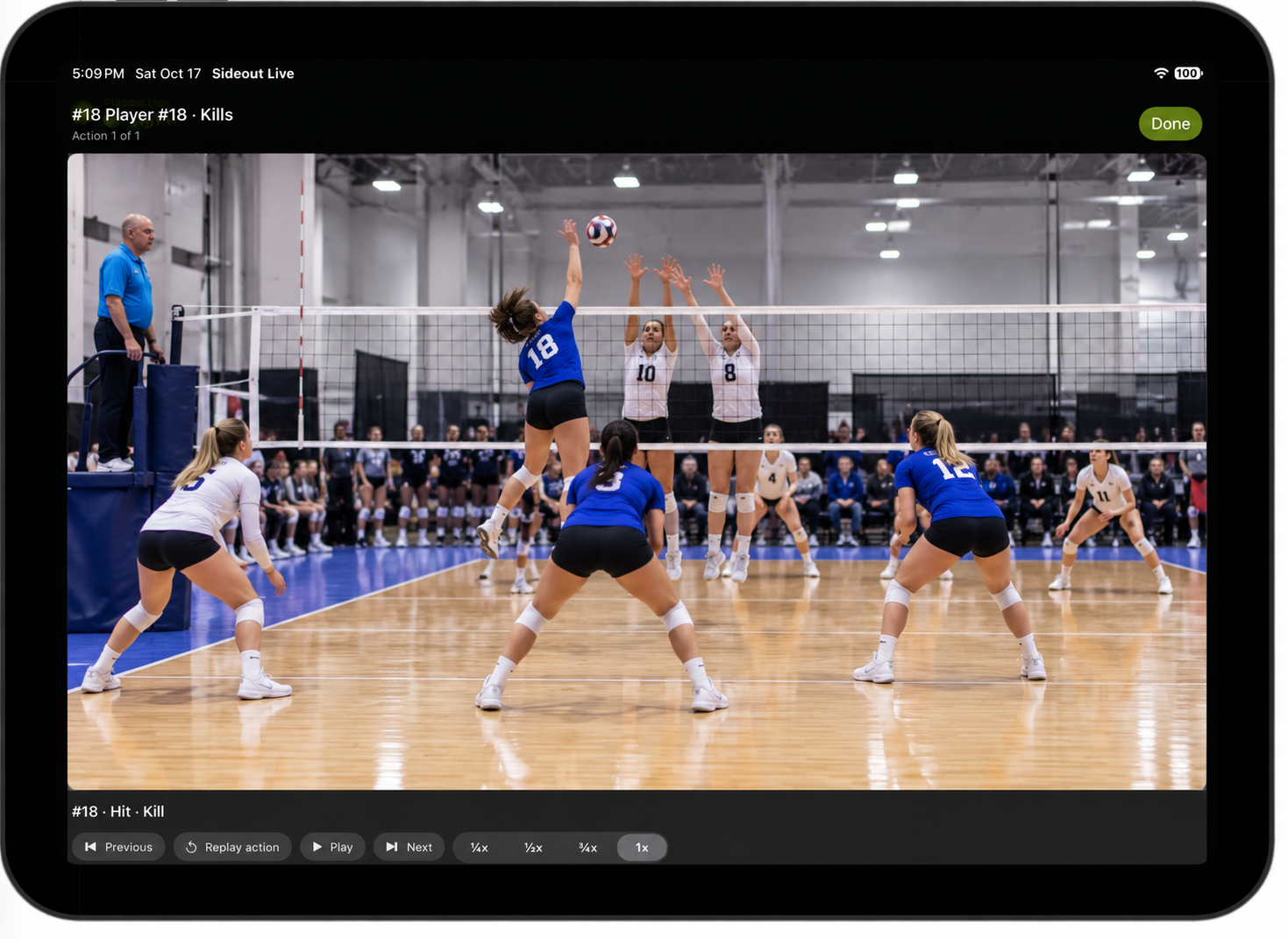
  • Return to the footage behind a touch
Explore live game stats

02 / AI ANALYSIS · RECORD & UPLOAD

No statkeeper?
Start with the camera.

Record the match or use video you already have from any camera or recording app. Upload it for Coach AI to suggest rallies and actions, then review and confirm the results.

RecordCapture your game
UploadSend the footage
AI analysisReview & confirm
Film + AI analysis + your review
  • Upload match footage recorded outside SideOut
  • Review rallies and suggested actions
  • Turn confirmed actions into insight
Explore AI analysis

AI analysis and shared team film depend on your plan. Public subscriptions are coming soon.

One records.
One keeps you in the game.

Connect two iPhones, two iPads or one of each. Record on one device while keeping live stats and replaying linked footage on the other. You can also record and keep stats on a single device.

Connect

Bring your devices together.

Choose Use as camera on one iPhone or iPad and Use as coach dashboard on the other. Either device can record. Keep both apps open with Wi-Fi and Bluetooth enabled, then tap Connect devices.

  1. Choose the camera role on either device.
  2. Choose the coach dashboard role on the other.
  3. Connect them to keep video and actions together.
Live Stats

Follow the ball.
Keep the details.

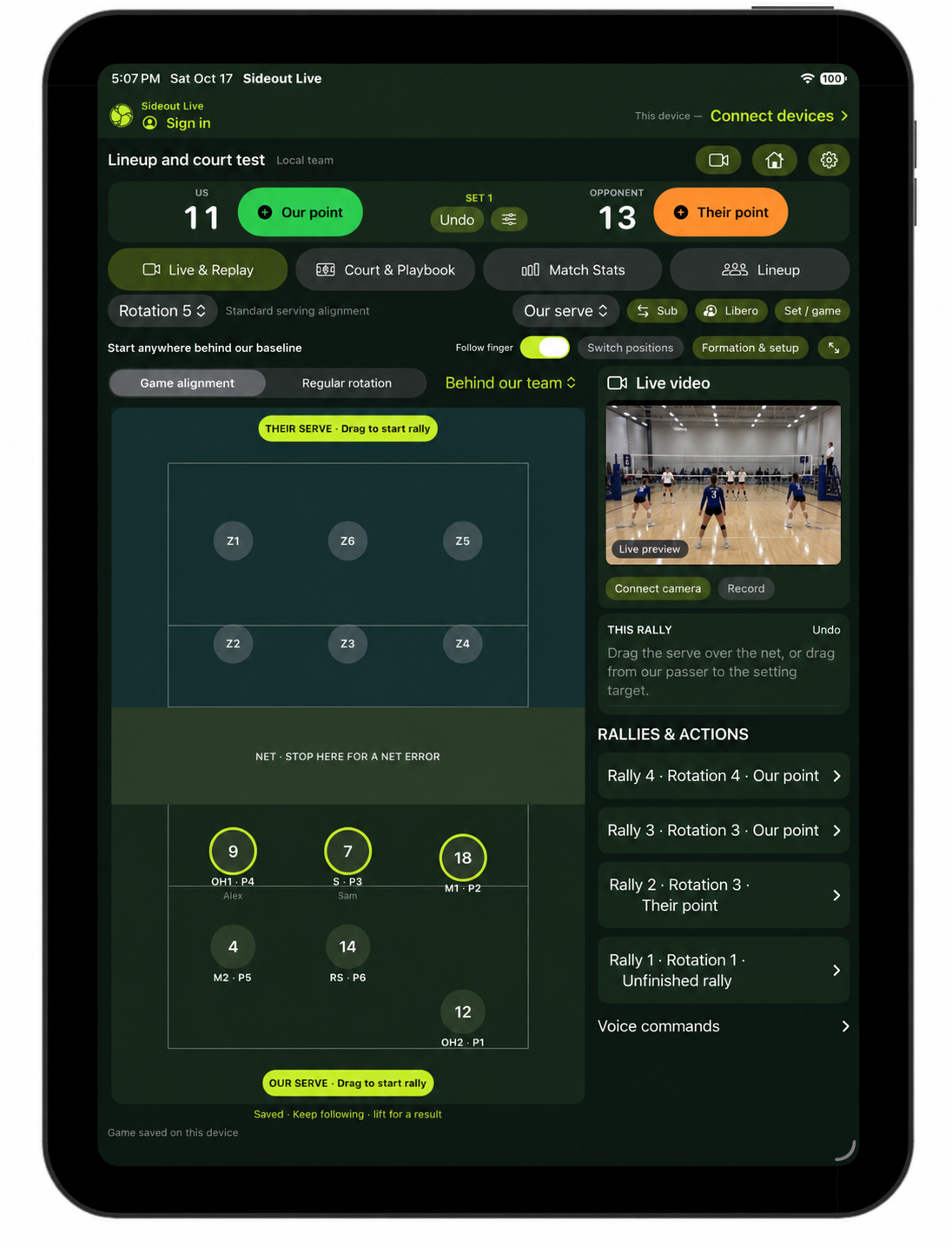
Drag on the court, follow the automatic switches and keep your players in view. Open stats to explore attack, serve and passing totals by player and set.

The court can fill the screen, or leave room for rally information beside it.

See formations in motion →

YOUR CAMERA ↔ YOUR STATS

In Game Replay

Watch it again.
Get it right.

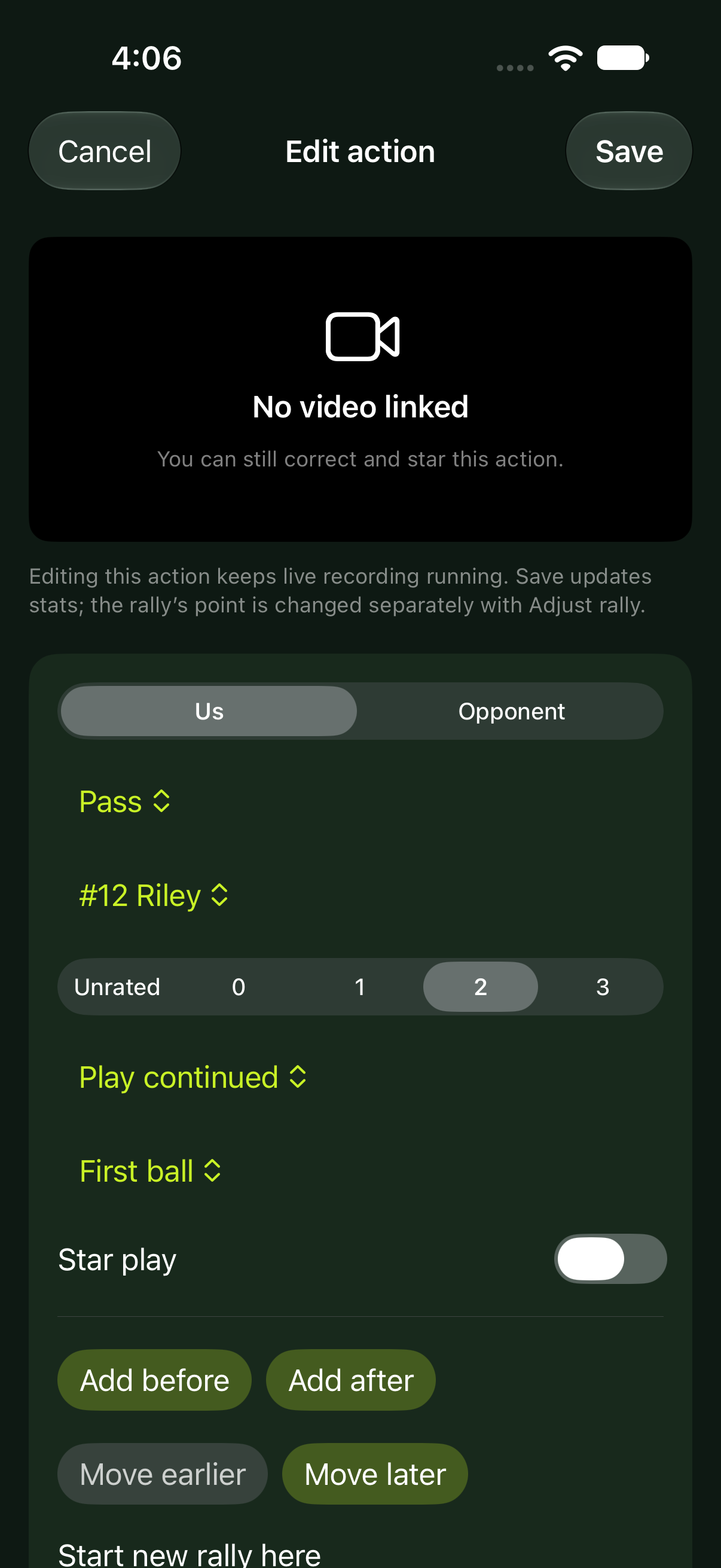
Open a saved rally or tap a stat to find the linked footage. Replay the touch, correct its player, result or time, and star a play to revisit.

Replay the last point while the camera keeps recording. Review linked footage on your tablet or phone without stopping and restarting the camera.

One device works, too. Record and keep stats on the same device when that suits your setup.

Take review further. Open the desktop workspace for larger reports, comparisons and shared team film, with access determined by your plan.

FORMATIONS & PLAYBOOK

Your formation.
Ready for every touch.

See your formations move with the rally. Explore the presets, make an alignment your own and customize the passing target your team uses during live play.

01 / FOLLOW THE ACTION

Your formations move
with the play.

Hold your finger down and follow the action with the green dot. SideOut switches your players into offense or defense as you trace each touch. Watch it work from our serve and serve receive.

01 / START WITH OUR SERVE

Our serve

Start in your serving alignment. Follow the serve, switch into defense, then trace the dig, set and attack.

Looping court illustration: Rotation 5 serving alignment, green follow-finger dot, automatic defense and offense switches, and a passing target during the dig to the setter.

02 / START WITH THEIR SERVE

Serve receive

Start in your receive formation. Follow the pass to your target, set and attack. Keep going through defense. When the setter digs, the libero takes the second ball with a forearm set—even inside the attack line—then the hitter attacks.

Looping court illustration based on the corrected Rotation 3 recording: stack-left receive formation, pass to the coach-defined target, set and attack, defense, then the setter digs and the on-court libero takes the second ball with a forearm set inside the attack line, followed by another attack. The back-row libero is labeled L.

Illustrated SideOut workflows · your touch draws the green dashed path. Passing and dig ratings use the landing you mark relative to your target. Target rings appear during first-touch tracking. When the setter digs, the on-court libero takes second ball; the libero can enter the front zone and forearm set there.

02 / CHOOSE YOUR ALIGNMENT

Start with a preset.
Make it your own.

Formation Builder

Choose the alignment for your rotation, with player roles and movement routes in view. Use a preset or move the roles to fit your team. Give the formation a name and save it to your team playbook. Sync it to your courtside device before the match.

Presets: Coach Live. Custom formation creation and editing: planned for Coach Pro and eligible Club Director plans.

ROTATION 3 · PRESET LIBRARY

Choose your starting point.

FORMATION BUILDER · INTERACTIVE PREVIEW

Your alignment.

Planned Coach Pro feature

Drag a role to move it. You can also select a role and use the arrow keys.

Preview only · changes stay on this page.

Moving a role clears the copied movement routes, matching the current builder. This preview does not change your account or save a team playbook.

SERVE-RECEIVE PERFORMANCE

Six rotations.
See what’s working.

Put the formation beside the result. Compare side-out percentage, pass quality and the number of receive rallies behind each rotation.

Illustrative demo data · made-up results, not a real team’s performance.

Rotation 1

DEMO

Front Row Stack Left

NETRSM2OH1OH2LS
67%side-out · 16/24
2.12pass avg / 3

24 rated passes · 24 receive rallies

First-ball kills 10/19Transition kills 3/8

Rotation 2

DEMO

OH2 and M2 are Passing

NETRSSOH2LOH1M2
72%side-out · 18/25
2.36pass avg / 3

25 rated passes · 25 receive rallies

First-ball kills 12/22Transition kills 3/7

Rotation 3

DEMO

Stack Left with RS Passing

NETM1SOH2LOH1RS
59%side-out · 13/22
1.95pass avg / 3

22 rated passes · 22 receive rallies

First-ball kills 8/17Transition kills 2/8

Rotation 4

DEMO

Stack Left H2 Passing

NETSM1OH2OH1LRS
65%side-out · 17/26
2.08pass avg / 3

26 rated passes · 26 receive rallies

First-ball kills 11/21Transition kills 3/8

Rotation 5

DEMO

RS Push Up

NETSRSM1OH2OH1L
65%side-out · 15/23
2.17pass avg / 3

23 rated passes · 23 receive rallies

First-ball kills 9/18Transition kills 3/8

Rotation 6

DEMO

Standard Receive

NETM2SOH1RSOH2L
75%side-out · 18/24
2.42pass avg / 3

24 rated passes · 24 receive rallies

First-ball kills 13/22Transition kills 3/6
What do these numbers mean?

Side-out is the percentage of receive rallies your team wins, with wins/receive rallies shown below the percentage. Pass average is the average recorded pass rating on a 0–3 scale. First-ball kills and transition kills show kills/attack attempts for each phase. The formation diagrams use SideOut presets; all results here are invented for this demo.

03 / RECEIVE & DIG TARGETS

Your target. Your settings.

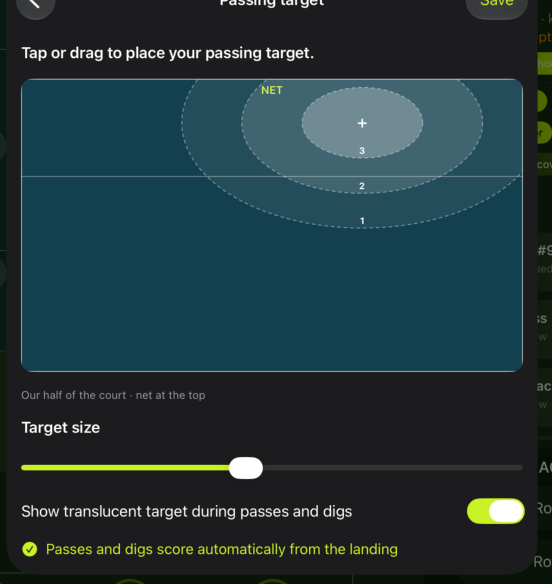
Set separate targets for serve receive and digging. Keep your receive target near the net and your digging target farther off, then adjust either one for your team.

Try it here: choose a target, move it around the court and resize its scoring rings. The iPad uses the receive target for passes and the digging target for digs.

Set both targets in the app’s Receive & dig targets settings. Ratings follow the landing you mark during the rally.

SideOut passing target settings: tap or drag to place the target, adjust target size, and show the translucent target during passes and digs.

THE NUMBER IS ONLY THE BEGINNING.

Find the pattern.
See the play.

Understand how your team performs—and what each athlete brings to the court. Compare the numbers, recognize the patterns and return to the touches behind them.

THE WHOLE TEAM, IN CONTEXT

Who’s making the difference?

Find your leaders in kills, passing, attack efficiency and defense. Spot runs of successful actions, then review the confirmed touches that produced them.

Player and team rankings with successful-action streaks. In the app, select a ranking to review its contributing actions. Equal values share a rank.

COURT INTELLIGENCE

See where the game is going.

Where they hit. Where you score. Which angles matter.

01 / LANDING HEAT MAP

Find the pressure.

See which areas draw the most attacks.

Attack landings by zoneNET · LANDING SIDEBACKCOURT
FewerMore attacks

40% land in Zone 6 16 of 40 attacks

Attack destinations · sample data

02 / ATTACK DIRECTIONS

Read the angles.

Follow each attack from contact to landing.

Attack origins and destinationsOUR TEAMOPPONENTCONTACT → LANDING
KillIn playError

6 / 10 attacks finish cross-court Contact and landing connected

Positioned attacks · sample data

THE ATHLETE BEHIND THE NUMBER

A clearer picture of every player.

A strength web brings attack, serve, pass, set, defense and involvement into one view. The supporting statistics and sample sizes keep that picture grounded in confirmed film.

Individual strengths · see the rated attempts behind each skill.
Different contributions · review the touches behind a player’s totals.

A PLAYER’S COMPLETE CONTRIBUTION

Look beyond the loudest stat.

See setting, passing and defense alongside attacking and serving. Use the profile to focus the next film session.

SAMPLE SIZE MATTERS

Read the number with its evidence.

The strength web shows rated attempts. A dash means there is no rated sample—not that a player scored zero.

FROM PROFILE TO PLAYBACK

Show the athlete what you see.

In the app, open all verified touches or select a statistic to review the contributing clips. Footage must be available for playback.

Advanced analytics and shared online review depend on the team’s membership. Player screenshots are actual product views; court analytics illustrations use sample data. Results depend on recorded actions and review status.

SideOut

Swipe across the screenshot to see the full table.

A PLAN FOR YOUR NEXT STEP

One coach to
your whole club.

Start with Coach Live. Add online team review, deeper tools or AI analysis when you need them.

Coming soon · planned annual pricing in USD

COACH LIVE

For your own sideline workflow.

$35/year · first team

14-day free trial planned

  • One named coach · iPhone & iPad apps included
  • +$30/year for each additional team
  • Scoring, rotations, subs & libero
  • Rosters & preset formations
  • Passing targets & 0–3 ratings
  • Player and team stats
  • Phone/iPad recording & local replay

COACH TEAM

Bring your athletes into the game.

Price to comeAnnual team license

Annual pricing to be announced

  • Coach Live tools for each licensed team
  • Invite athletes, parents & staff
  • Shared online stats
  • Upload device recordings
  • Private cloud film & linked playback
  • Coach-controlled sharing
  • Team practice lesson plans
  • Duplicate lessons and customize each practice day
  • Cloud allowances to be announced

COACH PRO

Turn your film into a coaching tool.

Price to comeAnnual team license

Annual pricing to be announced

  • Coach Team tools for each licensed team
  • Custom playlists & action collections
  • Edited clips & highlight exports
  • Advanced reports & comparisons
  • Custom Formation Builder
  • Team lesson planning, reuse & daily customization
  • Performance trends across games
  • Cloud allowances to be announced

COACH AI

Your film. An AI-assisted breakdown.

Coming soonPricing to be announced

Processing allowance to be announced

  • Coach Pro tools for your licensed teams
  • Upload film from any camera or recording app
  • AI-assisted rally & action breakdowns
  • Flag possible missed actions & corrections
  • Review and confirm the final actions
  • Stats, film, messaging, highlights & schedules
  • Team lesson plans, duplication & daily customization
  • Push alerts & event reminders planned

CLUB DIRECTOR

Your organization. Your combination.

CustomAnnual agreement

Built around your named teams

Discuss a club plan ↗
  • Coach Pro team tools included
  • Director access across approved teams
  • Club-wide statistics & athlete development trends
  • Evaluation oversight across authorized teams
  • Club calendar with practice, tournament & qualifier filters
  • Hour-by-hour availability across ten courts
  • Team lesson plans for each coach’s authorized teams
  • One shared daily club skills lesson plan
  • Duplicate club lessons to a new date & adjust assignments
  • Assign courts, coaches, age groups & positions
  • Publish assignments on team practice events
  • Send plans to coaches’ shared conversations
  • Club announcements & tournament discussions
  • Parent-managed athlete logins & shared family conversations
  • Club branding, invitations & team management
  • Central membership management for named teams
  • Optional AI analysis · billed separately

Automatic push delivery and event reminders are planned and not enabled yet. See notification status.

Compare planned features
FeatureCoach LiveCoach TeamCoach ProCoach AIClub Director
Coach Live · the essentials
Score, rotations, roster & preset formations✓✓✓✓✓
Local recording & stat-linked replay✓✓✓✓✓
Player & team statistics✓✓✓✓✓
Coach Team · add your team & families
Separate parent & athlete accounts—✓✓✓✓
Parent-managed athlete invitations—✓✓✓✓
Shared film, match stats & personal action feeds—✓✓✓✓
Personal published evaluations & feedback—✓✓✓✓
Team messaging & guardian-included conversations—✓✓✓✓
List/calendar views, all-team schedules & attendance—✓✓✓✓
Team practice lesson plans & daily customization—✓✓✓✓
Duplicate lessons to another practice date—✓✓✓✓
Published team practice lesson plans for families—✓✓✓✓
Published club skills assignments for linked teams—Club-linked teamsClub-linked teamsClub-linked teams✓
Message, highlight & calendar push alerts · planned—✓✓✓✓
Event reminders & athlete/parent RSVP · planned—✓✓✓✓
Coach Pro · add advanced coaching tools
Custom formations & team playbook——✓✓✓
Shared highlights, playlists & clip exports——✓✓✓
Advanced reports & performance trends——✓✓✓
Coach AI · add video analysis
Automatic video analysis———✓Optional · billed separately
AI-suggested rallies, actions & corrections for review———✓Optional · billed separately
Club Director · add club-wide management
Director access & club branding across approved teams————✓
Club-wide statistics & development trends————✓
Evaluation oversight across authorized teams————✓
Club calendar, qualifiers & ten-court timeline————✓
Shared club skills lessons & court/coach/group assignments————✓
Duplicate club lessons & customize daily court assignments————✓
Club lesson-plan & tournament conversations————✓

Coach Live: $35/year for your first team, plus $30/year for each additional team. Two teams are $65/year; three are $95/year. One named coach can use the iPhone and iPad apps with the same membership, including two iPhones, two iPads or one of each. Each team needs its own license.

Coach Team and Coach Pro annual prices are still being finalized. Club Director is a custom annual agreement across named teams. Club Director includes the Coach Pro team tools for approved teams. AI processing is optional and billed separately from the Club Director license. Coach AI includes Coach Pro team tools plus AI analysis for licensed teams; it does not include club director access or club-wide planning. Processing allowances will be announced.

Coach AI pricing and processing allowances will be announced separately. Cloud storage and video retention allowances will be published before purchasing opens. Skills Lab remains a separate offering.

A 14-day introductory trial is planned for eligible Coach Live subscribers. Apple confirms eligibility and the annual renewal price before purchase. Public signup and checkout are coming soon; no trial or charge begins on this page.

BUILT FOR CLUB DIRECTORS · COMING SOON

Different teams.
One direction.

See performance across teams and age groups, follow athlete development, and give each coach access to the teams they lead.

A shared formation library, central billing and optional pooled AI processing keep the club together.

Explore SideOut for clubs ↗

YOUR NEXT GAME STARTS HERE

Try SideOut.
14 days on us.

A 14-day trial is planned for eligible Coach Live subscribers. When signup opens, Apple will confirm your trial eligibility and annual subscription price before you approve the purchase. It renews annually unless canceled.

No trial or charge starts on this page. Public signup and checkout are coming soon. Club Director and future AI plans have separate onboarding.

COMING SOON

Less setup.
More volleyball.

Existing customer? Sign in ↗

A FEW DETAILS

Before the
first serve.

Do athletes and parents need to pay?

Coach Team and Coach Pro include invited athlete and parent access without separate subscriptions. Coach Live is for one named coach. Club access depends on each team’s selected plan; Coach AI details are coming soon.

Can I use video without uploading it?

Yes. Coach Live includes device recording and local playback. Coach Team and Coach Pro add private online team film and shared stats.

Does every plan automatically analyze video?

No. Coach Live, Coach Team and Coach Pro do not include automatic video analysis. Tracking is manual, with passing ratings calculated from the landing spot you mark.

Only Coach AI adds automatic video analysis, with or without coach-recorded actions. Review and confirm its suggestions before using the results. Club Director customers can add Coach AI for a separate charge. AI pricing and processing allowances are coming soon.

How will the trial work?

A 14-day introductory trial is planned for eligible Coach Live subscribers. Apple confirms eligibility before purchase. After the trial, the subscription renews annually at the price shown unless canceled. Trial enrollment is not available yet.

What about Skills Lab?

Individual skill development is a separate offering. Explore Player skills; pricing will be announced separately.